A modern smartwatch can serve several roles at once. It can display the time, track workouts, monitor selected wellness information, provide navigation, receive notifications, support communication, and connect to mobile networks. For people who spend significant time exercising or outdoors, a smartwatch can also become part of a broader activity and safety setup.
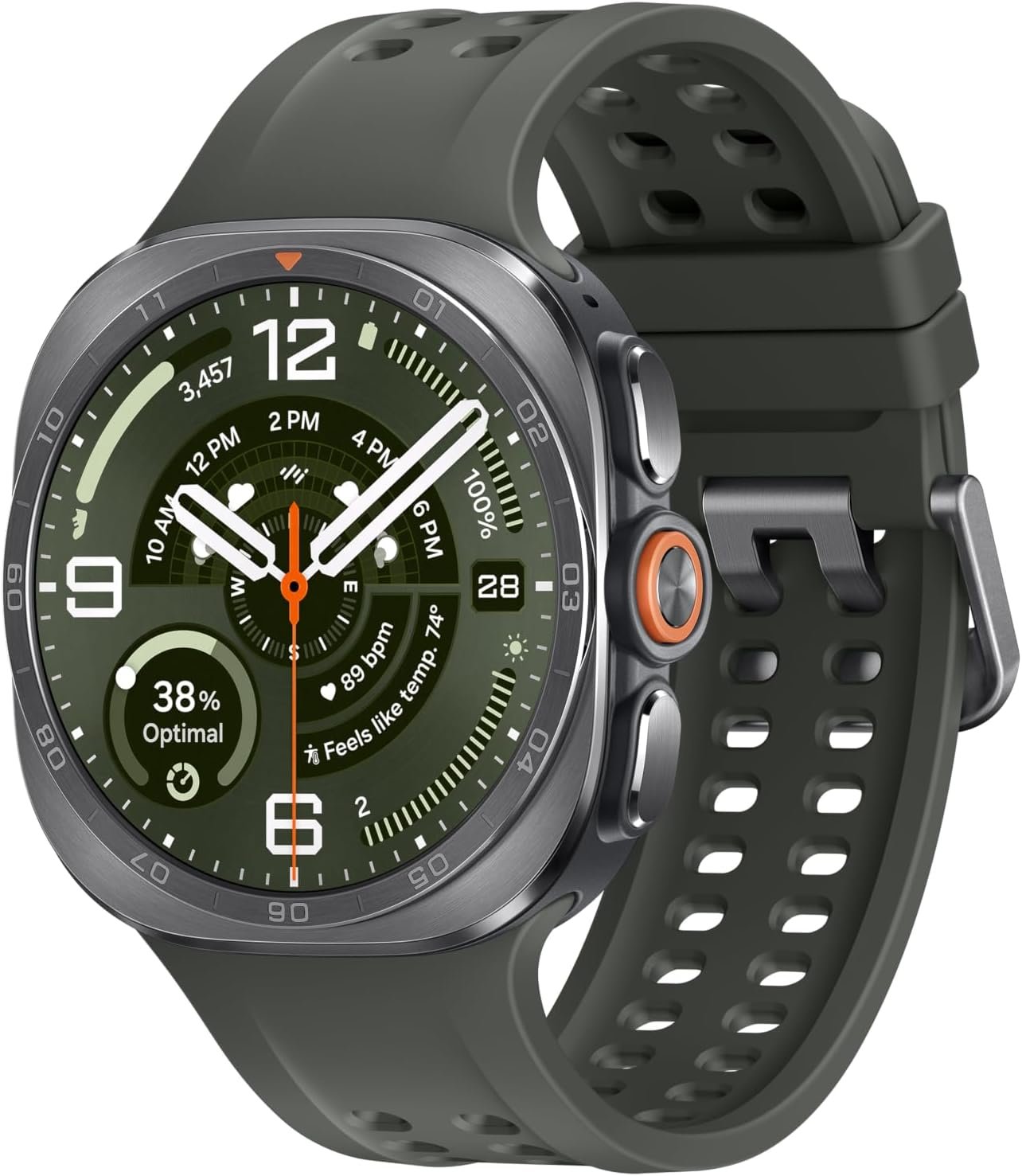
The Samsung Galaxy Watch Ultra2 in Titanium Silver with a 47mm case and LTE connectivity is designed around this more advanced smartwatch concept. It combines a rugged titanium construction with a Super AMOLED display, LTE connectivity, GPS, fitness and wellness sensors, onboard storage, NFC, and a range of features aimed at outdoor activities. Samsung lists the model with a 1.5-inch display, 64GB of storage, 2GB of memory, an 800mAh battery, and multiple durability certifications.
The Ultra2 is also different from a basic fitness band. Its feature set is designed to cover everyday smartwatch functions as well as more demanding activities such as running, cycling, hiking, and diving. Samsung currently lists IP69K and 10 ATM protection, MIL-STD-810H durability, and EN13319 certification for diving instruments.
That does not mean every feature is appropriate for every user. A 47mm smartwatch is physically substantial, LTE service depends on carrier and regional support, and the watch requires a compatible Android smartphone for initial activation and pairing. Samsung’s current compatibility documentation specifically states that Galaxy Watch Ultra2 requires Android 13 or later with at least 1.5GB of RAM and does not support iOS.
This guide looks at the Galaxy Watch Ultra2 from a practical perspective: what its main features mean, how it can be used, who may find this type of smartwatch suitable, and what should be considered before relying on it for fitness, communication, or outdoor activities.
Key Features of the Samsung Galaxy Watch Ultra2
47mm Titanium Construction
The physical design is one of the most distinctive aspects of the Galaxy Watch Ultra2.
The watch uses a titanium body and measures approximately 47.4 × 47.1 × 10.7mm, with a listed body weight of 61.5 grams. Samsung’s current specifications identify Titanium Silver as one of the available finishes.
A titanium case is relevant for users who want a substantial watch designed for active use without relying on a conventional stainless-steel construction.
The 47mm size also provides room for a relatively large display and internal hardware. However, larger does not automatically mean more comfortable for everyone.
Someone with a smaller wrist may find a 47mm case more noticeable than a compact smartwatch. The thickness and overall shape also matter, particularly when wearing the watch during sleep, exercise, or under clothing.
For users who prefer larger watches, however, the physical format can make the device feel more like a traditional outdoor instrument than a small fitness band.
Super AMOLED Display
The Galaxy Watch Ultra2 uses a 1.5-inch Super AMOLED display with a 498 × 498 resolution. Samsung lists brightness of up to 5,000 nits for the display.
Display brightness becomes particularly important for outdoor use.
A watch may be easy to read indoors but become difficult to see when direct sunlight hits the screen. A high maximum brightness gives the display more ability to remain visible under bright conditions, although actual visibility can still vary according to viewing angle, automatic brightness settings, screen content, and the surrounding environment.
The display is also useful for maps, workout information, notifications, controls, and other smartwatch functions.
Because the Ultra2 is designed around a larger 47mm case, the screen provides enough physical space for more information than many small fitness trackers.
Sapphire Crystal Display Protection
Samsung lists sapphire crystal for the 47mm Ultra2 display.
Sapphire crystal is commonly used in watches and wearable devices because of its strong scratch resistance compared with many conventional display-cover materials.
That does not mean the screen is impossible to damage.
A hard impact, contact with certain materials, or an accident can still cause damage. Users who take the watch into demanding environments should continue to treat the display as an electronic component rather than assuming that the protective material makes it indestructible.
800mAh Battery
The Galaxy Watch Ultra2 includes an 800mAh battery according to Samsung’s current specifications. Samsung lists usage of up to 80 hours with the always-on display turned off and up to 60 hours with the always-on display active under its stated testing conditions.
These figures provide useful context, but real-world battery life depends on how the watch is used.
LTE connectivity, GPS tracking, screen brightness, always-on display behavior, notifications, workouts, sensors, Wi-Fi, and other features can all influence battery consumption.
For example, a user spending several hours recording GPS workouts will generally place a different demand on the battery than someone primarily using the watch for notifications and timekeeping.
Battery capacity should therefore be understood as part of the overall design rather than as a guarantee of a particular number of days between charges.
LTE Connectivity
LTE is one of the most important differences between a cellular smartwatch and a Bluetooth-only model.
With a supported cellular plan and carrier configuration, the LTE version can provide certain connectivity functions even when the paired smartphone is not immediately nearby. Samsung lists LTE, Wi-Fi, Bluetooth, NFC, and GPS among the Ultra2’s connectivity options.
This can be useful during exercise.
A runner, for example, may prefer not to carry a smartphone during a short workout. Cellular connectivity can allow supported communication and connected services to remain available independently.
However, LTE functionality is not universal.
Carrier compatibility, regional network support, plan requirements, and eSIM activation all matter. Samsung specifically notes that LTE availability depends on the country or region and carrier.
Anyone purchasing an LTE smartwatch should therefore check the carrier requirements before assuming that cellular functionality will work with an existing phone plan.
Dual-Frequency GPS
The Ultra2 supports L1+L5 dual-frequency GPS along with multiple positioning systems, including GPS, GLONASS, BeiDou, Galileo, and QZSS.
Dual-frequency positioning is particularly relevant to outdoor activities.
GPS signals can become more challenging in environments with tall buildings, dense vegetation, steep terrain, or other obstructions. Multiple positioning technologies and dual-frequency reception can provide the watch with more information for determining location.
That does not make GPS infallible.
A smartwatch can still experience reduced positioning accuracy in tunnels, deep valleys, dense urban areas, heavy tree cover, or other difficult environments.
For ordinary running, cycling, walking, and hiking, however, built-in GPS can reduce dependence on a smartphone for basic route and location tracking.
64GB Storage
Samsung lists the Galaxy Watch Ultra2 with 2GB of memory and 64GB of storage, with approximately 49.3GB listed as available storage on its current specifications page.
Storage can support apps, music, and other compatible smartwatch content.
The amount of storage is particularly useful for people who want to use a smartwatch as more than a notification screen.
For example, compatible audio content can reduce the need to keep a phone immediately available during some workouts.
Storage does not mean every type of smartphone content can simply be transferred to the watch. What can be stored or accessed depends on the operating system, applications, supported formats, and Samsung or third-party services.
Wear OS Powered by Samsung
The Galaxy Watch Ultra2 runs Wear OS powered by Samsung. Samsung’s current information lists Wear OS 7 and One UI 9 Watch for the Ultra2.
The software platform is important because it determines how the watch interacts with apps, notifications, settings, smartphone services, and other connected functions.
Software updates can also add or modify functionality over time.
Users should therefore keep both the watch software and compatible smartphone applications updated when practical. Updates can address security, compatibility, performance, and feature-related issues.
Health and Fitness Sensors
The Ultra2 contains a range of sensors, including an accelerometer, barometer, bioelectrical impedance analysis sensor, electrical heart sensor, gyroscope, geomagnetic sensor, light sensor, optical heart-rate sensor, and temperature sensor.
These sensors support many of the watch’s health, activity, and fitness functions.
The BioActive Sensor system is designed to combine different types of measurements into the Samsung Health ecosystem.
However, wearable health measurements should be interpreted carefully.
Sensor-based measurements can be affected by movement, watch position, skin contact, individual physiology, exercise conditions, and other variables. They are useful for general wellness and activity tracking but should not automatically be treated as medical-grade measurements.
Water and Environmental Protection
The Galaxy Watch Ultra2 has a particularly extensive set of durability ratings.
Samsung lists 10 ATM, IP69K, MIL-STD-810H, and EN13319 certification for the Ultra2.
Each designation means something different.
IP69K relates to protection against dust and high-pressure, high-temperature water jets under defined testing conditions.
The 10 ATM rating relates to pressure resistance in water.
MIL-STD-810H refers to environmental durability testing across specified conditions.
EN13319 is an internationally recognized standard for diving instruments, and Samsung says the Ultra2 supports dive tracking down to 40 meters through its Depth app.
These ratings are useful because they address different environmental conditions. They should not, however, be interpreted as a blanket guarantee that the watch is immune to every form of physical or water-related damage.
How the Galaxy Watch Ultra2 Can Be Used
Running
Running is one of the natural use cases for the Ultra2.
The watch can combine GPS positioning, heart-rate information, workout tracking, and other fitness metrics in a single wearable.
For outdoor runners, the built-in GPS means the phone does not necessarily have to be held or used continuously for basic route tracking.
The larger screen can also make workout information easier to view while moving.
For more structured training, Samsung Health provides additional tools. Samsung describes features including Running Coach and personalized training programs for compatible devices and software configurations.
Training features should still be treated as guidance rather than a substitute for professional coaching when a user requires specialized athletic instruction.
Trail Running and Hiking
The Ultra2’s outdoor features are especially relevant to trail activities.
Samsung supports importing GPX routes for hiking and cycling and following those routes from the watch. The company also describes features such as elevation information and trail-oriented guidance.
This can be useful when exploring unfamiliar trails.
A user can prepare a route in advance and use the watch as one part of the navigation setup.
However, outdoor navigation should always have redundancy when conditions are remote or potentially hazardous.
A smartphone with offline maps, a physical map, backup power, appropriate clothing, water, and other safety equipment may still be important depending on the environment.
Cycling
Cyclists can use the Ultra2 for activity recording and location tracking.
Samsung also describes support for external cycling sensors, including power meters, speed sensors, and cadence sensors, with compatible setups.
This creates possibilities for cyclists who want to see more than basic distance and heart-rate information.
A smartwatch can be particularly useful for recreational cyclists who want one device that also functions as an everyday watch.
Dedicated cycling computers may still make more sense for riders whose routines revolve heavily around advanced cycling data and handlebar-mounted navigation.
Swimming and Water Activities
The Ultra2 is designed with substantial water resistance.
Samsung states that the device supports swimming and open-water use and describes dive tracking through the Depth app. The company lists real-time depth, water temperature, and dive-time information, with tracking down to 40 meters.
This is a more specialized capability than ordinary smartwatch water resistance.
Even so, users should follow all safety guidance for water activities. A smartwatch should not be treated as the only piece of equipment responsible for diver safety.
Gym Workouts
Indoor exercise is another straightforward use.
The watch can track activities such as walking, running, cycling, swimming, treadmill workouts, circuit training, and weight-machine sessions through supported Samsung Health functions.
The larger screen can make it convenient to review workout information between exercises.
For strength training, users should be mindful of physical contact with equipment. A substantial watch may be more noticeable when handling barbells or weights, and direct impacts can damage even durable devices.
Everyday Notifications
The Ultra2 does not have to be used exclusively as a sports watch.
Notifications can help users decide whether a message, call, calendar event, or other alert needs immediate attention.
This can reduce the need to constantly unlock a smartphone.
For people who work at a desk, travel frequently, or keep their phone in a bag, a smartwatch can provide a convenient second screen.
Calls and Messages
With Bluetooth and LTE connectivity, the Ultra2 can support communication functions depending on the phone, carrier, application, and network configuration.
The LTE capability is particularly useful for situations where the watch is operating away from the phone.
However, cellular service should not be assumed to work automatically simply because the watch is an LTE model.
A compatible carrier plan and supported network are still required.
Navigation and Location Awareness
Built-in GPS gives the Ultra2 an additional role as a location-aware device.
During a run, a user can track the route. During hiking, a compatible GPX route can provide guidance. During cycling, location data can help document the ride.
Navigation is one of the areas where a larger, bright display can make a meaningful practical difference.
At the same time, users should remember that GPS is not a substitute for situational awareness.
A route can become inaccessible because of weather, construction, trail closures, private property, or environmental hazards even when the digital map indicates otherwise.
Who May Find the Galaxy Watch Ultra2 Suitable?
Outdoor Enthusiasts
People who regularly hike, trail run, cycle, swim, or participate in other outdoor activities may appreciate the combination of GPS, environmental durability, a bright display, and fitness tracking.
The Ultra2 is designed to cover several of these activities without requiring a separate watch for each one.
Runners
Runners can use the device for route tracking, workout recording, heart-rate information, and training-related functions.
The larger display can also make information more accessible during an outdoor session.
Android Users
The Galaxy Watch Ultra2 is specifically designed for Android smartphones.
Samsung’s current compatibility documentation lists Android 13 or later with at least 1.5GB of RAM for Galaxy Watch Ultra2.
Galaxy smartphone users may have access to the broadest integration with Samsung’s ecosystem, although Samsung also supports compatible non-Samsung Android phones.
Users Interested in LTE Smartwatches
People who want a smartwatch that can remain connected when their phone is not immediately nearby may be interested in the LTE configuration.
This can be useful during running, cycling, errands, or other activities where carrying a smartphone is inconvenient.
The carrier requirement remains important.
Users Who Prefer Larger Watches
The 47mm case is designed for people comfortable with a substantial watch.
Those who prefer smaller, lightweight wearables may want to consider the physical dimensions carefully before choosing a large-format smartwatch.
Important Things to Consider
The Ultra2 Does Not Support iPhone Pairing
This is one of the most important compatibility considerations.
Despite being a smartwatch rather than a phone-specific accessory, the Galaxy Watch Ultra2 does not support iOS. Samsung’s current compatibility table specifically lists iOS as unsupported for the Watch Ultra2.
This means iPhone owners should not purchase the watch expecting the same type of pairing experience available to Android users.
The product’s compatibility should therefore be checked before considering other features.
LTE Does Not Mean Unlimited Cellular Independence
LTE provides cellular connectivity, but it does not eliminate the need for a supported carrier and appropriate service plan.
Samsung states that LTE availability varies by country, region, and carrier.
There may also be differences in supported services depending on the network and account configuration.
Anyone specifically purchasing the Ultra2 for cellular use should verify eSIM and carrier compatibility before setup.
Battery Life Changes With Usage
The 800mAh battery provides substantial capacity, but battery consumption depends on how the watch is configured.
GPS workouts, LTE, the always-on display, frequent notifications, Wi-Fi, Bluetooth, sensors, and screen brightness can all increase energy use.
Samsung’s published figures of up to 80 hours with AOD off and up to 60 hours with AOD on are based on specified testing conditions rather than a universal real-world guarantee.
The Watch Is Relatively Large
The 47mm size is an advantage for users who want a large screen, but it can also be a disadvantage for those who prefer compact wearables.
Before choosing the Ultra2, users should consider wrist size, sleeping comfort, clothing clearance, and whether a large watch is practical for their normal activities.
Health Information Is Not a Diagnosis
The Ultra2 provides extensive health and wellness measurements, but wearable measurements should not be treated as a substitute for professional medical equipment or clinical assessment.
Samsung itself describes various Samsung Health functions in wellness terms and includes limitations around medical interpretation.
If a measurement appears unusual or a person has symptoms or a medical concern, professional medical advice is more appropriate than relying solely on a smartwatch reading.
Water Resistance Has Limits
Even with 10 ATM, IP69K, and EN13319 certification, users should follow Samsung’s instructions for cleaning, water exposure, and diving.
The ratings describe specific forms of protection and testing. They do not mean the watch can be subjected to unlimited combinations of pressure, temperature, chemicals, and impact.
Water resistance can also change if the watch is damaged.
Comparing General Smartwatch Categories
Galaxy Watch Ultra2 vs. Basic Fitness Band
A fitness band is usually smaller, lighter, and focused primarily on activity and wellness tracking.
The Ultra2 is considerably broader in scope.
It combines fitness functions with GPS, LTE, apps, notifications, onboard storage, NFC, navigation features, and a large display.
The trade-off is size, complexity, and charging requirements.
A person primarily interested in step tracking may not need the functionality of a large outdoor smartwatch, while someone who wants a multifunctional device may benefit from the broader feature set.
Galaxy Watch Ultra2 vs. Standard Smartwatch
A conventional smartwatch often focuses on notifications, communication, applications, and general fitness.
The Ultra2 places additional emphasis on outdoor durability and specialized activities.
Its combination of 10 ATM, IP69K, MIL-STD-810H, and EN13319 certification distinguishes its intended use environment from many everyday smartwatches.
However, users who rarely exercise outdoors may not need those specialized characteristics.
Galaxy Watch Ultra2 vs. Dedicated Sports Watch
Dedicated sports watches often focus heavily on endurance training, running analytics, cycling, or outdoor navigation.
The Ultra2 attempts to combine these types of functions with a broader smartwatch ecosystem.
This makes the category distinction less about one device being universally suitable and more about the user’s priorities.
Someone who wants apps, LTE communication, notifications, payments, and everyday smartwatch features alongside fitness tracking may prefer a multifunctional smartwatch.
An athlete who primarily needs specialized training analysis may instead focus on the features of dedicated sports equipment.
Galaxy Watch Ultra2 vs. Traditional Outdoor Watch
A traditional outdoor watch provides timekeeping without apps, software updates, or charging requirements.
The Ultra2 adds GPS, connectivity, sensors, navigation, fitness tracking, and digital services.
That added functionality comes with additional complexity.
Users need to manage charging, software, smartphone compatibility, accounts, and connectivity.
Making Fitness Tracking More Useful
The value of a smartwatch is not determined only by the number of measurements it can collect.
Consistency matters.
A person might use the Ultra2 to record walking, running, cycling, swimming, or gym workouts over several weeks. The resulting information can help reveal patterns.
For example, someone may discover that weekday activity is consistently lower than weekend activity. That observation could lead to a simple change, such as adding a short walk during lunch.
Likewise, a runner can use route and workout information to compare different sessions without turning every workout into a competition.
The best use of wearable data is generally contextual.
Sleep, nutrition, recovery, stress, weather, terrain, and other circumstances can influence performance. A smartwatch provides information, but the user still needs to interpret that information sensibly.
Using the Ultra2 for Outdoor Safety
Safety functions can be valuable during outdoor activities.
Samsung describes fall detection, emergency SOS, and an 86-decibel safety siren that can be activated by holding the Quick Button for five seconds. The company says the siren can be heard up to 180 meters away under stated conditions.
These functions can provide additional options in an emergency.
However, no electronic safety feature should be considered guaranteed.
GPS coverage can vary, cellular service may be unavailable, battery power can run out, and environmental conditions can interfere with communication.
For remote activities, users should still plan properly, tell someone where they are going when appropriate, carry sufficient supplies, and use backup safety equipment suited to the activity.
Setting Up the Galaxy Watch Ultra2
Initial setup begins with a compatible Android smartphone.
Samsung’s current requirements indicate Android 13 or later and at least 1.5GB of RAM for the Watch Ultra2, with device and regional compatibility potentially varying.
After pairing, users can configure watch faces, notifications, applications, Samsung Health settings, connectivity options, and privacy preferences.
LTE users should complete cellular activation through a supported carrier.
It is also useful to configure emergency and safety features before taking the watch into remote environments.
Users should become familiar with the Quick Button, emergency functions, GPS settings, workout controls, and battery indicators at home rather than attempting to learn them during a difficult outdoor activity.
Care and Maintenance
A rugged smartwatch still benefits from routine care.
After exercise, sweat and moisture should be cleaned according to Samsung’s recommendations. The watch and band should be kept clean, particularly when the device is worn continuously.
The display should be checked after significant impacts.
Although sapphire crystal and titanium construction provide substantial durability characteristics, physical damage can still occur.
Water resistance should not be assumed to remain unchanged after severe impacts or repairs.
When charging, the charging surface and watch should be appropriately positioned and free of unnecessary debris or moisture.
Keeping software updated is also part of normal smartwatch maintenance. Updates can improve security, compatibility, and functionality.
Frequently Asked Questions
What is the Samsung Galaxy Watch Ultra2?
The Galaxy Watch Ultra2 is a 47mm smartwatch designed for everyday connectivity, fitness tracking, outdoor activities, navigation, and cellular communication. It uses Wear OS powered by Samsung and includes LTE, GPS, Wi-Fi, Bluetooth, NFC, and extensive sensor hardware.
What size is the Galaxy Watch Ultra2?
The Ultra2 uses a 47mm case. Samsung lists its dimensions as approximately 47.4 × 47.1 × 10.7mm and its body weight at 61.5 grams.
Does the Galaxy Watch Ultra2 work with iPhone?
No. Samsung’s current compatibility documentation states that the Galaxy Watch Ultra2 does not support iOS. It requires a compatible Android smartphone.
What Android version is required?
Samsung currently lists Android 13.0 or later with at least 1.5GB of RAM for the Galaxy Watch Ultra2, although compatible devices can vary by manufacturer, region, and configuration.
Does the Galaxy Watch Ultra2 have LTE?
Yes. The model described here is an LTE version with embedded SIM support. LTE functionality requires appropriate carrier and regional support.
Does LTE allow the watch to work without a phone?
LTE can allow supported cellular functions to operate when the smartphone is not nearby, but the exact functionality depends on the carrier, plan, network, and service configuration.
How large is the display?
Samsung lists a 1.5-inch display with a 498 × 498 resolution for the 47mm Ultra2. The display can reach up to 5,000 nits under Samsung’s stated conditions.
How much storage does it have?
Samsung lists 64GB of storage and 2GB of memory, with approximately 49.3GB listed as available storage.
Does the Galaxy Watch Ultra2 have GPS?
Yes. It supports GPS and multiple satellite-positioning systems, including L1+L5 dual-frequency GPS.
Can it be used for hiking?
Yes. The Ultra2 supports outdoor activity tracking and GPX route functionality for supported hiking and cycling workflows.
Can it be used for diving?
Samsung describes the Ultra2 as EN13319-certified as a diving instrument and provides a Depth app for tracking depth, water temperature, and elapsed dive time, with supported tracking down to 40 meters.
Users should still follow appropriate diving safety procedures and should not treat the watch as a replacement for professional dive equipment or training.
What does 10 ATM mean?
10 ATM describes resistance to water pressure under defined testing conditions. It should not be interpreted as an unlimited guarantee for every type of underwater activity.
What does IP69K mean?
IP69K indicates protection against dust and high-pressure, high-temperature water jets under specified test conditions. It is a different type of protection from the 10 ATM water-pressure rating.
How long can the battery last?
Samsung lists up to 80 hours of usage with the always-on display off and up to 60 hours with it active, under specified conditions. Actual battery life depends on features, settings, connectivity, and usage patterns.
Can it track workouts?
Yes. The watch supports numerous workout categories and integrates with Samsung Health for fitness tracking. Supported functions include running, walking, cycling, swimming, and other exercise modes.
Are the health measurements medical readings?
They should not automatically be treated as medical measurements. Wearable sensor data is intended primarily for wellness and fitness purposes, and readings can vary depending on conditions and individual factors.
Can the Ultra2 make calls?
The watch supports communication through Bluetooth and LTE, depending on the connected phone, carrier, account, and software configuration.
Does the Ultra2 support NFC?
Yes. Samsung lists NFC among the connectivity features of the Galaxy Watch Ultra2.
Is the watch suitable for everyday wear?
It can be used as an everyday smartwatch, but its 47mm size and rugged construction make it more substantial than many compact wearables. Users should consider wrist size and personal comfort.
Conclusion
The Samsung Galaxy Watch Ultra2 47mm LTE in Titanium Silver is designed as a multifunctional smartwatch that combines everyday connectivity with a strong emphasis on fitness and outdoor use.
Its 47mm titanium construction provides a substantial physical platform, while the 1.5-inch Super AMOLED display offers a large interface with brightness of up to 5,000 nits under Samsung’s specified conditions. The 800mAh battery, LTE connectivity, dual-frequency GPS, 64GB storage, NFC, and extensive sensor system give the watch a broad range of possible applications.
For runners, hikers, cyclists, swimmers, and other active users, the combination of GPS, workout tracking, Samsung Health, outdoor durability, and navigation tools can make the watch useful across several types of activities.
The durability specifications are also notable. Samsung lists 10 ATM, IP69K, MIL-STD-810H, and EN13319 certification, providing different forms of protection and environmental capability.
At the same time, the Ultra2 is not a universally compatible smartwatch. It requires a compatible Android smartphone and does not support iPhone pairing. LTE service also depends on carrier and regional availability.
Its larger size, advanced functionality, and extensive outdoor features may also be more than some users need. Someone who mainly wants step counting and basic notifications may prefer a simpler wearable, while someone looking for a combination of smartwatch features, cellular connectivity, GPS, fitness tracking, and outdoor capabilities may have different priorities.
As with any connected wearable, the most practical approach is to match the watch’s capabilities with the activities and smartphone ecosystem in which it will actually be used. Checking current compatibility, carrier support, software requirements, and manufacturer guidance before setup can help avoid unexpected limitations.